Guidelines
Guidelines
Usage
A Person Item should:
- Be fully clickable as a target and never include interactive elements like links or buttons.
- Have consistent content amount as other items when used in a group.
- Have appearance be set to 'dark' in light interfaces and 'light' in dark interfaces.
- Have its appearance align with the other Items when used in a group.
- Redirect to external profile pages should open in a new tab.
Content
Profile Image
A Person Item should:
- Include a clear portrait-style profile-image showing the person's face without helmets, goggles or sunglasses.
- Have its profile-image-framed property set to 'true' when the Person Item is placed on images or texturized surfaces to make it stand out.

Name and Meta Information
A Person Item should:
- Present the person's real name without any additional content for the clearest presentation of a person. Nicknames and gamer tags can be included.
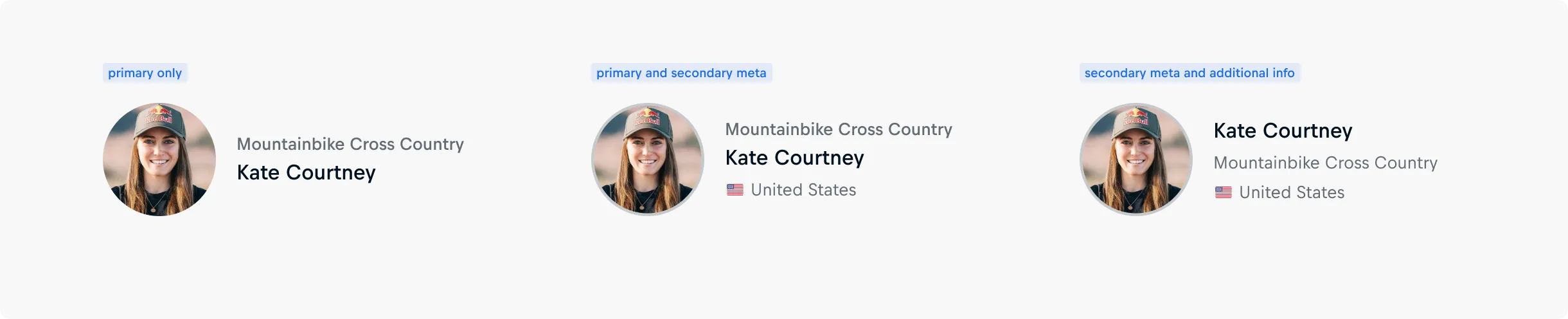
- Include up to three meta information items to add context, such as nationality, role, or affiliation.
- Use meta-text-primary above the name for high-priority or standout details. Its use is not required if meta information is provided — meta-text-secondary and additional-info can be used on their own if more appropriate to provide further context; However, additional-info should only be used if meta-text-secondary is true.
- Keep all meta information short and scannable, as each item is truncated to a single line of text.
- Use similar amount of meta information across all items in a group to ensure visual balance and consistency.
- Use the meta prefix slots for visual cues such as flags, icons, or images that support quick scanning and recognition. If it is an icon, the meta prefixes should be the same color as the text.
🎨 How to implement a prefix in Figma
A Person Items meta-information can set a prefix when its meaning should be visually emphasized, e.g. through commonly used elements such as flags for the nationality meta-information or icons for additional meta-information.
When multiple prefixes are presented in a Person Item, have the size of the prefixes be harmonious.
Find a tutorial on changing prefixes in Figma, including an explanation of prefix definition and the specific sizes used in our components here.
Number
A Person Item should:
- Include the person's jersey or starting number when it serves as a recognizable or essential part of their identity in a given sport.
- Use only official numbers — avoid internal IDs, placeholders, or non-sport-related values.
- Keep numbers short and legible — typically one to two digits — to maintain clarity and impact.
- Only include a number if it adds meaningful value for recognition or context in the current use case.

Size
A Person Item should:
- Use size 'small' for a condensed layout where multiple Items are displayed in a list or rail.
- Have its width set, in size 'small', to constrain the width to be a maximum of 30% of the total viewport width on desktop and tablet and a maximum of 50% viewport width on mobile for optimized presentation and readability.
- Use size 'medium' for more generous layouts where there is only one Item presented at a time.
- Have its width, in size 'medium', to be constrained to a maximum of 30% on desktop, 40% on tablet, and less than 90% on mobile of the total viewport width.